

CeCredential Features
- About Us
-
Catalogs
- 2025-26 University Catalog
- 2025-26 Law Catalog
- 2024-25 University Catalog
- 2024-25 Law Catalog
- 2023-24 University Catalog
- 2023-24 Law Catalog
- 2022-23 University Catalog
- 2022-23 Law Catalog
- 2021-22 University Catalog
- 2021-22 Law Catalog
- 2020-21 University Catalog
- 2020-21 Law Catalog
- Past Catalogs
- Course Descriptions
-
Forms
- Advisor Change Request Form
- Application for Immediate Reinstatement (Undergraduate)
- Reinstatement Application (Undergraduate)
- Application for a Junior or Senior to Take a Single Law Course
- Application for a 2L or 3L to Take a Single Undergraduate Course
- Auditing Course Request Form
- Change of Requirements Effective Date
- Credit Transfer for Approved Study Abroad
- Credit Transfer for US Off-Campus Study
- Degree Application (Undergraduate)
- Degree Application (Law)
- Drop-Add Form (Late Registration Changes)
- Employee/Spouse/Partner Tuition-Free Courses
- Exchange Applications (Undergraduate)
- FDR Checklists
- Authorization for School Officials to Release Academic Information About Former Student (FERPA Release)
- First-Year Students' Credit Transfer Form
- Honors Thesis Release to W&L Library
- Independent Work Major Proposal
- Incomplete Grade Request
- Incomplete Grade Request - Extension
- Leave of Absence: Initial Application (Undergraduate)
- Law School Leave of Absence Application
- Leave of Absence: Return to Campus Application (Undergraduate)
- Major Declaration Form
- Non-Degree Seeking Application
- Overload Request (Undergraduate)
- Pass/Fail Request (Undergraduate)
- Student Readiness to Return to W&L (Undergraduate)
- Permission for Human-Subject Research (IRB)
- Registration Override Form
- ROTC Cadet Form for PE Credit for PT
- RTEC 13th-Term Teaching Application
- Spring Option Declaration
- Study Abroad Application Process
- Transcript Order
- W-9S SSN Request Form
- Withdrawal (Undergraduate)
- Withdrawal (Law)
- World-Language Teaching Assistants Credit Confirmation
- Resources
- Services
-
Policies & Procedures
- Add/Drop Policies
- Auditing a Course
- Undergraduate Credit Definition
- Class Absence Policy and Procedure for Athletes
- Class Time Blocks
- Class Block Schedule for Spring Term
- Credit from Away Policies
- Curricular Advice for New Students
- Placement Results for W&L Placement Tests
- Exam Procedure and Classrooms
- FERPA
- Grading
- Incomplete Grade
- Independent Work Majors
- Internship Policies for Undergraduates
- Waiving FDR-FL
- Petitioning Faculty Committees
- Repeating a Course
- Student Handbook
-
Courses & Registration
- New Course Numbers Effective Fall 2026
- Course Offerings
- Current Catalog
- Foundation and Distribution Offerings
- Spring Term Domestic Courses
- Registration Help for Students
- Registration Help for Faculty and Staff
- Registration Help for Parents
- Registration and Policies for W&L Summer Work
- New Student Registration Information
- First-Year Fall Term Course Selection Guide
- Registration Override Form
- Late Drop-Add Form
-
Calendars
- University Calendar (Campus Events)
- Undergraduate Academic Calendar, 2025-2026
- Law Academic Calendar, 2025-2026
- Undergraduate Academic Calendar, 2026-2027
- Law Academic Calendar, 2026-2027
- Housing & Residence Life Calendar
- Five-Year Undergraduate Planning Calendar
- Past Academic Calendars
- Faculty Meetings Schedule
How to Validate the CeCredential
A CeCredential can be validated online one of two ways:
- Credential VALIDATION PAGE: To ensure the Degree or credential information is still valid, we highly recommend you visit the School’s official website, Washington and Lee University Credential Validation webpage, to perform an additional validation.
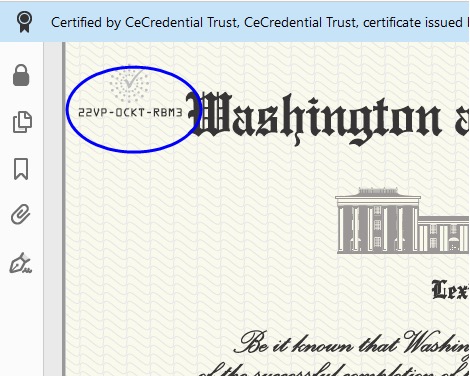
Enter the 12 digit CeDiD found in the upper corner of the CeCredential, along with the first two letters of the name as it appears on the document. - DIGITAL SIGNATURE: All CeCredentials from Washington and Lee University are digitally signed by CeCredential Trust. When the document is viewed through Adobe Reader or Acrobat versions 9.0 or higher, it will reveal that a Digital Signature has been applied to the document.
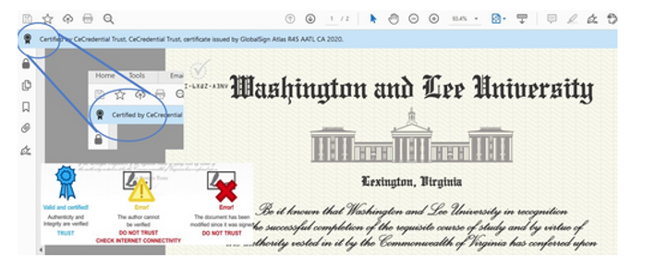
Adobe Reader and Acrobat use a blue ribbon across the top of the document to indicate document has not been tampered with, and is therefore authentic.
Attn Mac users: When viewing an official electronic credential from Washington and Lee University, the software utilizes Adobe’s secure certified PDF technology and therefore may only be viewed using the free Adobe Reader or Adobe Acrobat 9.0 or higher. The default Mac preview application will not display the document correctly.
Questions or Concerns
If you have further questions, or need additional help, please contact the Registrar’s Office. For all inquiries, please include the CeDiD number and the name of the graduate as it appears on the CeCredential.
- About Us
- Catalogs
- Forms
- Resources
- Services
- Policies & Procedures
- Courses & Registration
- Calendars
University Registrar
- P: 540-458-8455
- F: 540-458-8045
- E: registrar@wlu.edu
-
Mailing Address
University Registrar’s Office
204 West Washington Street
Washington and Lee University
Lexington, Virginia 24450-2116
Physical Address
University Registrar’s Office
Rockbridge Building 011
9 South Main Street
Lexington, Virginia 24450-2116